Draftwatch
Review an AI’s edits to your writing the way you’d review a pull request.
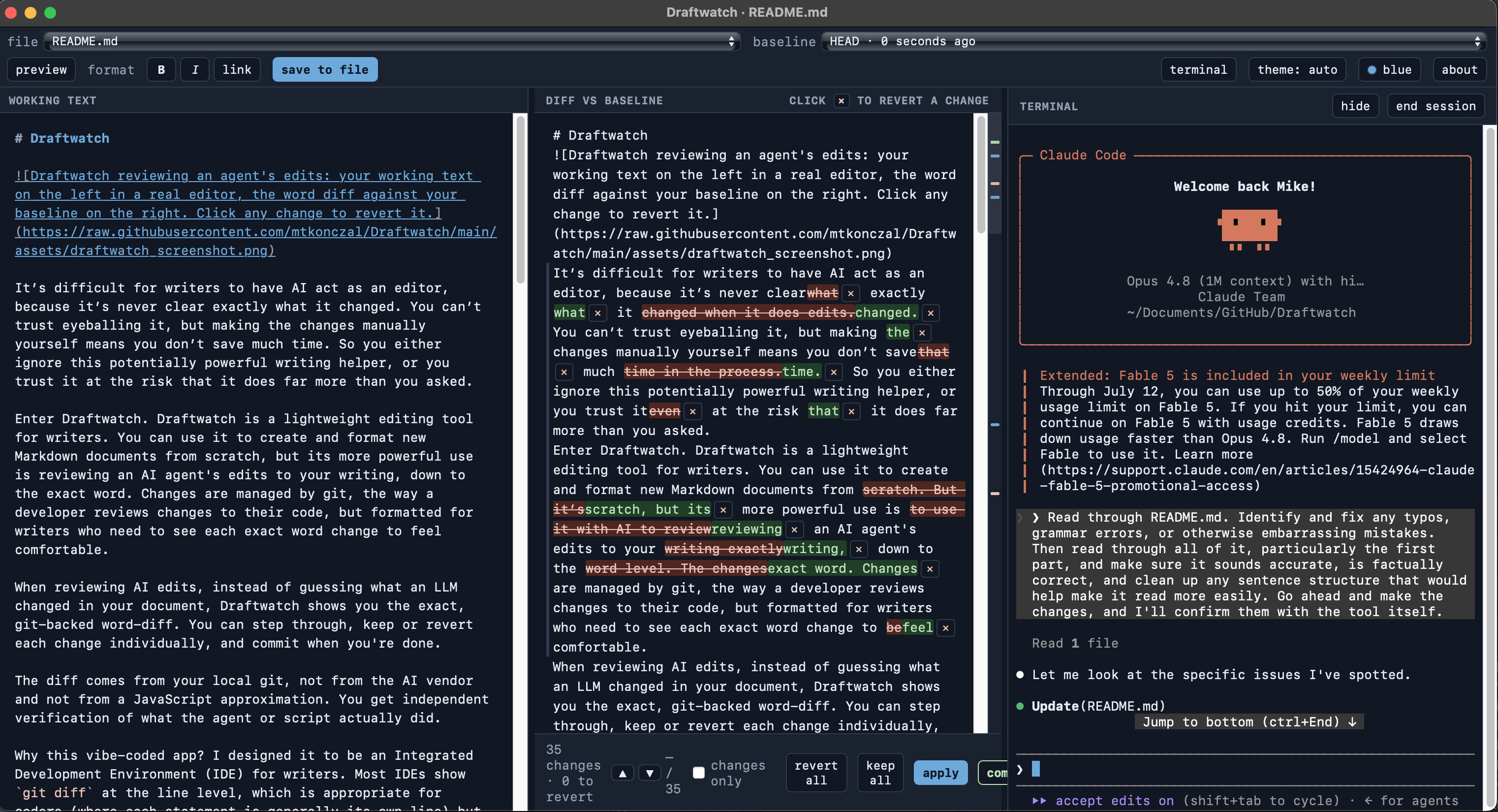
It’s difficult for writers to have AI act as an editor, because it’s never clear exactly what it changed. You can’t trust eyeballing it, but making the changes manually yourself means you don’t save much time. So you either ignore this potentially powerful writing helper, or you trust it at the risk that it does far more than you asked.
Enter Draftwatch. Draftwatch is a lightweight editing tool for writers. You can use it to create and format new Markdown documents from scratch, but its more powerful use is reviewing an AI agent’s edits to your writing, down to the exact word. Changes are managed by git, the way a developer reviews changes to their code, but formatted for writers who need to see each exact word change to feel comfortable.
When reviewing AI edits, instead of guessing what an LLM changed in your document, Draftwatch shows you the exact, git-backed word-diff. You can step through, keep or revert each change individually, and commit when you’re done.
The diff comes from your local git, not from the AI vendor and not from a JavaScript approximation. You get independent verification of what the agent or script actually did.
Why this vibe-coded app? I designed it to be an Integrated Development Environment (IDE) for writers. Most IDEs show git diff at the line level, which is appropriate for coders (where each statement is generally its own line) but terrible for writers, who work at the paragraph level. This IDE is built around displaying git diff --word-diff=porcelain, which lets writers see the specific words being edited. Even the IDEs that do show this make it harder for writers to track edits, and they carry coding features and visual baggage that writers won’t need.
Python 3.9+ and git are the only requirements. If you are a writer, AI itself can help you install these widely used tools. The front-end libraries (CodeMirror 6, marked, DOMPurify, Turndown, xterm.js) are vendored and served locally, so Draftwatch works completely offline and binds to your local computer.
Install
Draftwatch is available on PyPI. You can install or run it using your preferred Python package manager:
# pipx
pipx install draftwatch

# uv
uv tool install draftwatch

# standard pip
pip install draftwatch
Usage
Run it from inside a git repository you write in:
draftwatchOr to start with a specific file:
draftwatch draft.mdYou can also run it outside any git repository. Draftwatch starts in write-only mode: the editor, preview, and saving all work, but the review loop (diffs, revert, commit) is off because there’s no git to compare against. The right panel offers a one-click initialize git here to turn the folder into a repo and switch on the full review loop.
Starting a second instance while one is already running just works: if the default port is busy, Draftwatch picks a free one and prints the URL.
Draftwatch opens a two-panel review window: your source on the left (a real editor with markdown highlighting, search, and a live preview), the diff against your baseline on the right. Review the changes, revert the ones you don’t want, apply, then commit. Committing advances the baseline, so the next agent pass starts clean.
Start without a file (draftwatch) to pick one in the window.
The terminal panel
Click terminal in the toolbar to open a third panel running a real shell in your repo (macOS/Linux). Launch claude, codex, or any command there: when the agent edits the file you’re watching, the diff panel lights up live: prompt on the right, review in the middle, write on the left. hide collapses the panel and leaves the shell running (an agent mid-task keeps working); end session kills the shell and everything it started. No snapshots are taken when you run commands; edits accumulate against whatever baseline you’ve selected, and you review them on your schedule. On Windows the panel is unavailable and Draftwatch runs without it.
Features
- Real git word-diffs, so what you see is exactly what git sees.
- Keep or revert changes one hunk at a time, or all at once, then commit from the UI.
- Switchable baseline: last push, HEAD, or an earlier commit.
- Jump between changes or collapse to a changes-only view for long documents.
- Editable markdown preview alongside the raw source.
- You and the agent can both edit; your unsaved work is never clobbered when the file changes on disk.
- Embedded terminal panel (macOS/Linux): run your agent next to the diff without leaving the window.
- Resizable panels: drag the dividers to change the split (double-click to reset).
Options
draftwatch [target] [--port 8787] [--no-open] [--no-terminal] [--app | --no-app]target: file to watch. Optional; omit it to pick one in the UI.--port: default8787. If omitted and the default is busy, Draftwatch picks a free port automatically; pass--portto pin an exact one (it then fails loudly if that port is taken).--no-open: don’t auto-open a window (useful headless or over SSH).--no-terminal: disable the embedded terminal panel entirely (its routes are removed from the server, not just hidden in the UI).--app/--no-app: force or disable the native window. It is on by default when pywebview is installed and falls back to the browser otherwise.
License
MIT. See LICENSE.
This section is the project README, synced from GitHub — run scripts/sync-draftwatch-readme.sh to refresh it.